
ترجمة آلية تحت المراجعة
التوافه
المصدر الأصليقائمة تنفيذ التمرين
تُحفظ علامات هذه القائمة على هذا الجهاز والمتصفح فقط. أنشئ حسابًا مفعّلًا لحفظ إنجاز التمرين في مسارك.
التوافه
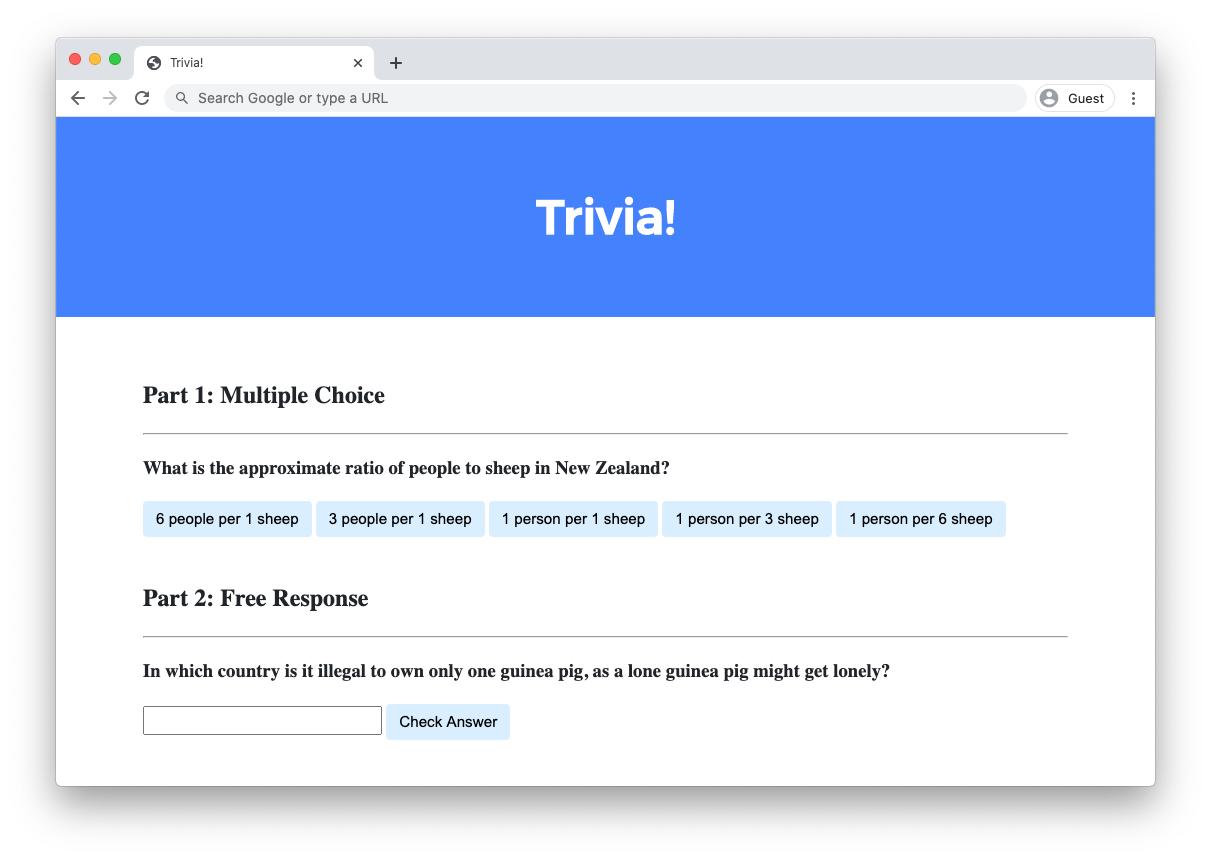
اكتب صفحة ويب تتيح للمستخدمين الإجابة على الأسئلة التافهة.
البدء
مفتوح cs50.dev.
ابدأ بالنقر داخل النافذة الطرفية، ثم قم بالتنفيذ cd بمفرده. يجب أن تجد أن "المطالبة" الخاصة بها تشبه ما يلي.
$
انقر داخل تلك النافذة الطرفية ثم قم بالتنفيذ
wget https://cdn.cs50.net/2025/fall/psets/8/trivia.zip
متبوعًا بـ Enter لتنزيل ملف مضغوط يسمى trivia.zip في مساحة الشيفرة الخاصة بك. احرص على عدم إغفال المسافة بينهما wget وعنوان URL التالي، أو أي حرف آخر في هذا الشأن!
نفذ الآن
unzip trivia.zip
لإنشاء مجلد يسمى trivia. لم تعد بحاجة إلى ملف ZIP، حتى تتمكن من التنفيذ
rm trivia.zip
ثم قم بالرد بـ "y" متبوعًا بـ Enter عند المطالبة لإزالة ملف ZIP الذي قمت بتنزيله.
الآن اكتب
cd trivia
متبوعًا بـ Enter للانتقال إلى (i.e.، open) هذا الدليل. يجب أن تشبه مطالبتك الآن ما يلي.
trivia/ $
إذا كان كل شيء ناجحًا، فيجب عليك التنفيذ
ls
ويجب أن تشاهد index.html ملف و styles.css ملف.
إذا واجهت أي مشكلة، فاتبع نفس الخطوات مرة أخرى لترى ما إذا كان بإمكانك تحديد الخطأ الذي ارتكبته!
تفاصيل التنفيذ
صمم صفحة ويب باستخدام HTML وCSS وJavaScript للسماح للمستخدمين بالإجابة على الأسئلة التافهة.
- في
index.html، أضف أسفل "الجزء الأول" سؤالًا تافهًا متعدد الاختيارات من اختيارك باستخدام HTML.- يجب عليك استخدام
h3العنوان لنص سؤالك. - ينبغي أن يكون لديك واحدة
buttonلكل خيار من خيارات الإجابة المحتملة. يجب أن يكون هناك ثلاثة اختيارات للإجابة على الأقل، ويجب أن يكون أحدها صحيحًا.
- يجب عليك استخدام
- باستخدام JavaScript، قم بإضافة المنطق بحيث تتغير ألوان الأزرار عندما ينقر المستخدم عليها.
- إذا قام المستخدم بالنقر فوق زر يحتوي على إجابة غير صحيحة، فيجب أن يتحول الزر إلى اللون الأحمر ويجب أن يظهر النص أسفل السؤال "غير صحيح".
- إذا قام المستخدم بالنقر فوق زر يحتوي على الإجابة الصحيحة، فيجب أن يتحول الزر إلى اللون الأخضر ويجب أن يظهر النص أسفل السؤال الذي يقول "صحيح!".
- في
index.html، أضف أسفل "الجزء 2" سؤالًا نصيًا مجانيًا للإجابة من اختيارك باستخدام HTML.- يجب عليك استخدام
h3العنوان لنص سؤالك. - يجب عليك استخدام
inputللسماح للمستخدم بكتابة الرد. - يجب عليك استخدام ملف
buttonللسماح للمستخدم بتأكيد إجابته.
- يجب عليك استخدام
- باستخدام JavaScript، قم بإضافة المنطق بحيث يتغير لون حقل النص عندما يؤكد المستخدم إجابته.
- إذا كتب المستخدم إجابة غير صحيحة وضغط على زر التأكيد، فيجب أن يتحول حقل النص إلى اللون الأحمر ويجب أن يظهر النص أسفل السؤال الذي يقول "غير صحيح".
- إذا كتب المستخدم الإجابة الصحيحة وضغط على زر التأكيد، فيجب أن يتحول حقل الإدخال إلى اللون الأخضر ويجب أن يظهر النص أسفل السؤال الذي يقول "صحيح!".
اختياريًا، يمكنك أيضًا:
- تحرير
styles.cssلتغيير CSS لصفحة الويب الخاصة بك! - أضف أسئلة تافهة إضافية إلى اختبار التوافه الخاص بك إذا كنت ترغب في ذلك!
الإرشادات التفصيلية
تم تسجيل هذا الفيديو عندما كانت الدورة التدريبية لا تزال تستخدم CS50 IDE لكتابة الشيفرة. على الرغم من أن الواجهة قد تبدو مختلفة عن مساحة الشيفرة الخاصة بك، إلا أن سلوك البيئتين يجب أن يكون متشابهًا إلى حد كبير!
تلميحات
- استخدم
document.querySelectorللاستعلام عن عنصر HTML واحد. - استخدم
document.querySelectorAllللاستعلام عن عناصر HTML المتعددة التي تطابق الاستعلام. تقوم الدالة بإرجاع مصفوفة من كافة العناصر المطابقة.
لست متأكدًا من كيفية الحل؟
الاختبار
لا check50 لهذا السؤال، حيث ستختلف عمليات التنفيذ بناءً على أسئلتك! ولكن تأكد من اختبار الإجابات الصحيحة وغير الصحيحة لكل سؤال من أسئلتك للتأكد من استجابة صفحة الويب الخاصة بك بشكل مناسب.
تشغيل http-server في جهازك الطرفي أثناء تواجدك في
دليل trivia لبدء خادم الويب الذي يخدم صفحة الويب الخاصة بك.
كيفية الإرسال
في جهازك الطرفي، قم بتنفيذ ما يلي لإرسال عملك، والإجابة على المطالبات التي تظهر أيضًا.
submit50 cs50/problems/2026/x/trivia
هل تريد رؤية الحل الذي قدمه فريق العمل؟ يمكنك العثور على طريقتين لحل المشكلة هنا!
إنشاء مستمعي الأحداث باستخدام JavaScript
<!DOCTYPE html>

<html lang="en">
    <head>
        <link href="https://fonts.googleapis.com/css2?family=Montserrat:wght@500&display=swap" rel="stylesheet">
        <link href="styles.css" rel="stylesheet">
        <title>Trivia!</title>
        <script>

            // Wait for DOM content to load
            document.addEventListener('DOMContentLoaded', function() {

                // Get all elements with class "correct"
                let corrects = document.querySelectorAll('.correct');

                // Add event listeners to each correct button
                for (let i = 0; i < corrects.length; i++) {
                    corrects[i].addEventListener('click', function() {

                        // Set background color to green
                        corrects[i].style.backgroundColor = 'Green';

                        // Go to parent element of correct button and find the first element with class "feedback" which has that parent
                        corrects[i].parentElement.querySelector('.feedback').innerHTML = 'Correct!';
                    });
                }

                // When any incorrect answer is clicked, change color to red.
                let incorrects = document.querySelectorAll(".incorrect");
                for (let i = 0; i < incorrects.length; i++) {
                    incorrects[i].addEventListener('click', function() {

                        // Set background color to green
                        incorrects[i].style.backgroundColor = 'Red';

                        // Go to parent element of correct button and find the first element with class "feedback" which has that parent
                        incorrects[i].parentElement.querySelector('.feedback').innerHTML = 'Incorrect';
                    });
                }

                // Check free response submission
                document.querySelector('#check').addEventListener('click', function() {
                    let input = document.querySelector('input');
                    if (input.value === 'Switzerland') {
                        input.style.backgroundColor = 'green';
                        input.parentElement.querySelector('.feedback').innerHTML = 'Correct!';
                    }
                    else {
                        input.style.backgroundColor = 'red';
                        input.parentElement.querySelector('.feedback').innerHTML = 'Incorrect';
                    }
                });
            });
        </script>
    </head>
    <body>
        <div class="header">
            <h1>Trivia!</h1>
        </div>

        <div class="container">
            <div class="section">
                <h2>Part 1: Multiple Choice </h2>
                <hr>
                <h3>What is the approximate ratio of people to sheep in New Zealand?</h3>
                <button class="incorrect">6 people per 1 sheep</button>
                <button class="incorrect">3 people per 1 sheep</button>
                <button class="incorrect">1 person per 1 sheep</button>
                <button class="incorrect">1 person per 3 sheep</button>
                <button class="correct">1 person per 6 sheep</button>
                <p class="feedback"></p>
            </div>

            <div class="section">
                <h2>Part 2: Free Response</h2>
                <hr>
                <h3>In which country is it illegal to own only one guinea pig, as a lone guinea pig might get lonely?</h3>
                <input type="text"></input>
                <button id="check">Check Answer</button>
                <p class="feedback"></p>
            </div>
        </div>
    </body>
</html>
إنشاء مستمعي الأحداث باستخدام HTML
<!DOCTYPE html>

<html lang="en">
    <head>
        <link href="https://fonts.googleapis.com/css2?family=Montserrat:wght@500&display=swap" rel="stylesheet">
        <link href="styles.css" rel="stylesheet">
        <title>Trivia!</title>
        <script>
            function checkMultiChoice(event) {

                // Get the element which triggered the event
                let button = event.target;

                // Check if the element's inner HTML matches expected answer
                if (button.innerHTML == '1 person per 6 sheep') {
                    button.style.backgroundColor = 'Green';
                    button.parentElement.querySelector('.feedback').innerHTML = 'Correct!';
                }
                else {
                    button.style.backgroundColor = 'Red';
                    button.parentElement.querySelector('.feedback').innerHTML = 'Incorrect';
                }
            }

            function checkFreeResponse(event) {

                // Get the element which triggered the event
                let button = event.target;

                // Get the input element corresponding to the button
                let input = button.parentElement.querySelector('input');

                // Check for correct answer
                if (input.value === 'Switzerland') {
                    input.style.backgroundColor = 'Green';
                    input.parentElement.querySelector('.feedback').innerHTML = 'Correct!';
                }
                else {
                    input.style.backgroundColor = 'Red';
                    input.parentElement.querySelector('.feedback').innerHTML = 'Incorrect';
                }
            }
        </script>
    </head>
    <body>
        <div class="header">
            <h1>Trivia!</h1>
        </div>

        <div class="container">
            <div class="section">
                <h2>Part 1: Multiple Choice </h2>
                <hr>
                <h3>What is the approximate ratio of people to sheep in New Zealand?</h3>
                <button onclick="checkMultiChoice(event)">6 people per 1 sheep</button>
                <button onclick="checkMultiChoice(event)">3 people per 1 sheep</button>
                <button onclick="checkMultiChoice(event)">1 person per 1 sheep</button>
                <button onclick="checkMultiChoice(event)">1 person per 3 sheep</button>
                <button onclick="checkMultiChoice(event)">1 person per 6 sheep</button>
                <p class="feedback"></p>
            </div>

            <div class="section">
                <h2>Part 2: Free Response</h2>
                <hr>
                <h3>In which country is it illegal to own only one guinea pig, as a lone guinea pig might get lonely?</h3>
                <input type="text"></input>
                <button onclick="checkFreeResponse(event)">Check Answer</button>
                <p class="feedback"></p>
            </div>
        </div>
    </body>
</html>